
You ask an AI assistant to prepare a proposal, then spend the afternoon reminding it where the files live and what you agreed last week. OpenAI dots, launched September 29, 2026, are OpenAI's attempt to give that work a persistent home: a named agent with its own cloud computer that can pursue goals across connected apps. The useful question is how much of that promise you can actually put to work at launch, and where you still need to supervise it.
At a glance
| Question | OpenAI dots at launch |
|---|---|
| What is it? | A named primary, personal agent that OpenAI describes as always on and able to pursue goals across projects. |
| Model | GPT-6 Astra, according to OpenAI's model announcement. |
| Where does it run? | On its own cloud computer with a browser; optional laptop access requires permission and starts off. |
| Channels | ChatGPT, Slack, Microsoft Teams and user-initiated voice calls. General texting access is not a launch feature. |
| Integrations | OpenAI says its plugin ecosystem can connect dots to over 4,000 apps. Specific access depends on connections and permissions. |
| Memory | Learns from feedback and retains context; users currently cannot view, modify or delete individual dot memories. |
| Availability and plans | Gradual rollout on eligible Pro and Business Premium plans; Enterprise beta requires an admin to enable it. Geographic rules differ by plan. |
| Cost as stated | First dot included at no extra cost on Pro and Business Premium, with a deeper-work allowance and extended first-month limits. |
| What is unknown? | Additional-dot pricing, later usage terms, complete country list and any dots-specific service-level or compliance attestation. |
What OpenAI dots are
OpenAI introduced dots on September 29, 2026, as agents you can name, direct and return to. The starting point is one primary dot that works toward your goals using its own cloud environment and the apps you connect, while you can continue with other work. OpenAI says it can handle several projects concurrently; it has not specified a concurrency limit in the launch announcement.
Think of a dot as a continuing working relationship rather than a new chat window for every task. For a proposal, you could have it gather material from permitted apps, then inspect its work before using the result. App support varies.
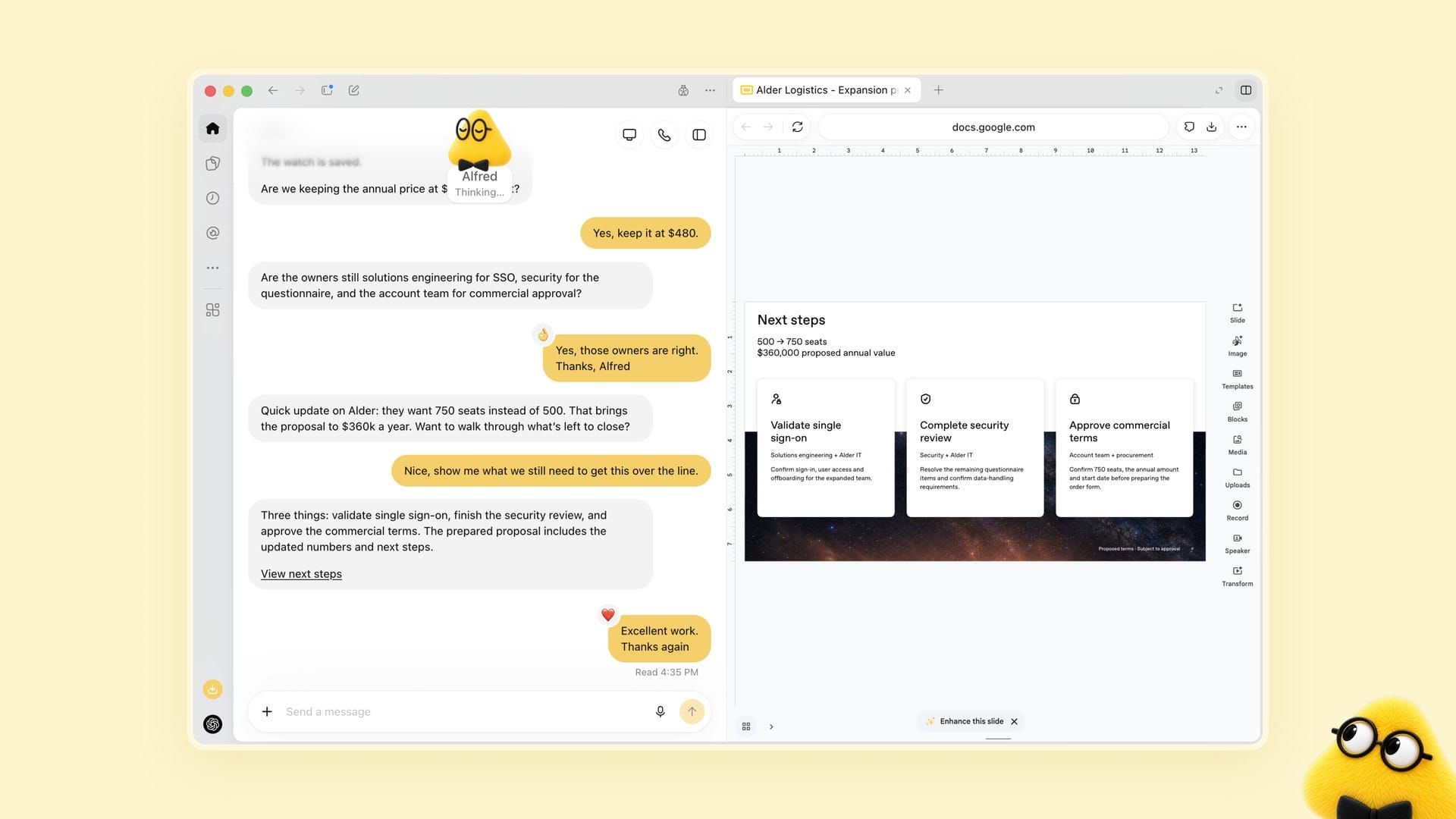
What stands out to me is the combination of continuity and a visible workspace. OpenAI says you can open the dot's cloud computer to inspect what it has done, so the agent is not supposed to be an invisible background process. Visibility still leaves a practical question: who approves an action that affects customers or shared company data?
OpenAI says dots can work toward goals 24/7. That is no uptime promise. OpenAI also describes a narrower background activity called proactive research.
How dots work
Its own cloud computer and browser
Each dot has its own cloud computer and browser, according to OpenAI. You can open that computer to inspect work done with your connected apps.
It helps to separate a research assignment from an authorized action. When you are not actively working with a dot, OpenAI says its "proactive research" uses read-only tools on connected apps; those tools cannot send messages, change app content or control a browser or computer. That restriction does not mean every task a user explicitly authorizes is read-only. OpenAI describes action review and approvals.
Dots can still make mistakes, so review consequential work.
Memory and learning
OpenAI says a dot learns your preferences and standards through feedback. You could correct a draft's tone and expect that preference to inform future work. OpenAI has not quantified how reliably corrections carry over.
The privacy trade-off deserves a direct answer. According to OpenAI's dots privacy and safety FAQ, you currently cannot view, delete or directly modify individual dot memories. Disconnecting a plugin does not erase context the dot previously retained from it. If an assignment requires fine-grained editing of a worker's remembered context, check that limitation before connecting a sensitive app.
Training settings also vary by workspace. OpenAI says content from ChatGPT Business, Enterprise and Edu workspaces is not used to improve its models by default; on personal ChatGPT plans, users can control whether dots' conversations and work are used for model improvement.
Plugins and 4,000+ apps
OpenAI says dots can connect to over 4,000 apps through its plugin ecosystem. It is an ecosystem count, not a verified list of applications that will work with every dot, plan or region. The apps you connect and the permissions available through ChatGPT app controls determine what your dot can reach.
My read is that access design will matter more than the headline app count for a business team. Start with the smallest useful set of sources, decide which outputs require human sign-off, and add write access only when the workflow needs it. Our AI agent security checklist and progressive trust playbook cover those decisions without assuming an agent should have every credential on day one.
Channels: ChatGPT, Slack, Teams, voice
You can work with your dot in ChatGPT, Slack or Microsoft Teams, according to OpenAI's announcement. You can also start a voice call to discuss a task. OpenAI's help center says your dot cannot initiate a call to you at launch, so "voice" should not be read as an outbound calling service.
Texting has a similar launch-day caveat. The announcement says it is coming soon, while the getting-started guide describes a limited US Pro beta; neither supports a claim of general SMS availability. The help center also says a dot cannot have its own standalone email address at launch. If email identity is part of your delegation process, that is a concrete difference rather than a minor channel detail.
Laptop access and oversight
A dot can use its own cloud computer without access to your laptop. OpenAI says connecting a local computer is optional, starts turned off, and requires its desktop app and your confirmation.
App permissions sit in ChatGPT app controls, and OpenAI describes action review and approvals. Those safeguards cannot catch every mistake. Set approval boundaries before asking a dot to edit a shared record, then check its output.
Availability, plans and cost
OpenAI's getting-started guide says rollout is gradual and access can take several days to reach an account. Pro access is in markets outside the European Economic Area, Switzerland and the UK. Business Premium is available across supported ChatGPT regions, while Enterprise access is a beta that an admin must enable because it starts off by default. In other words, the Pro exclusion does not cover Business Premium, and Enterprise teams need an admin to switch the beta on.
The launch announcement says your first dot is included in a Pro or Business Premium plan at no extra cost. It also says the plan includes an allowance for deeper work, with extended limits for the first month after launch. "Included" does not mean unlimited: the announcement does not state a quantitative allowance or the price of any future extra usage, and it does not make the same first-dot cost promise for Enterprise.
OpenAI has not provided a standalone dots price, an additional-dot price or post-launch usage terms in these materials. Its help guidance says it will share usage terms after the initial period. GPT-6 Astra API and Codex prices do not tell you what additional dots or later dot usage will cost.
Specialist dots and teams of dots
OpenAI has previewed specialist dots with their own identity for access management, support for IT-provisioned hardware and deeper integrations with organizational systems of record. The company says it is starting focused enterprise pilots. That is not a general-availability announcement, and a buyer should not assume those controls come with today's primary dot.
OpenAI also envisions teams of dots collaborating on a user's behalf over time. At launch, the described starting point is one named primary dot. I would resist designing a multi-dot department around the preview until OpenAI specifies availability, administration and pricing. For now, the practical decision is whether one personal dot can safely handle a defined slice of work.
How dots differ from workspace agents, Codex and the Agents API
OpenAI now uses several overlapping agent labels. The distinction is the intended user and workflow, not whether a product can ever run while you are away. Its workspace agents announcement explicitly says those agents can run on schedules, so scheduled work is not unique to dots.
| Product | What it is for | How it relates to dots |
|---|---|---|
| Dots | Your named primary agent for goals and projects across connected apps. | Personal starting point at launch; specialist dots are still in focused enterprise pilots. |
| Workspace agents | Shared, builder-configured organizational agents, described as an evolution of GPTs and powered by Codex. | Can run on schedules and support shared workflows; they are not simply unscheduled or short-lived versions of dots. |
| Codex | OpenAI's software engineering agent for code work, as described in its original release article. | A dot can create Codex cloud tasks; the two are not mutually exclusive. |
| Agents API | Developer infrastructure that exposes the Codex harness through an OpenAI-managed API. | An application supplies tools and chooses its execution environment; the API also supports durable sessions. Its pricing is not dots pricing. |
The cleanest way to choose is by ownership. If one person wants continuing help across their permitted work, assess dots. If a team needs a shared agent with configured organizational workflows, assess workspace agents; if the job is code, assess Codex. If developers are building an agent into their own application, the Agents API is infrastructure rather than an end-user dot. For more context on the underlying model, see our GPT-6 Astra review.
What is still unknown
The first-dot inclusion is real, but the commercial picture is incomplete. OpenAI has not specified pricing for additional dots, quantitative deeper-work allowances, or usage terms after the launch period in the examined dots materials. There is also no full country-by-country market list there; the help center's plan-level rules are more useful than assuming a single global rollout.
OpenAI describes app permission controls, read-only proactive research and action approvals. I have not found a dots-specific compliance attestation in the cited dots launch and help materials, so I would not treat those safeguards as a certification. Nor do those materials provide a dots-specific uptime SLA, a measured reliability result, or individual-memory editing controls. Ask your procurement and security teams what proof they need before putting sensitive work into production.
Unknown does not mean absent forever. It means the published launch information is not enough to answer a purchase or policy question. Recheck plan access and usage terms at the point of purchase, especially if availability in your region is a gating factor.
Who dots are for, and where they fall short
A dot is a plausible fit for an eligible Pro user who wants one named agent to keep track of preferences while handling permitted research and project work. It can also appeal to an organization already comfortable with ChatGPT app controls, provided its admins agree on data access and review gates. A trial assignment with low-risk source material is more informative than giving a new agent a broad set of permissions.
A team that needs its worker to receive email at an individual address cannot get that from a dot at launch. Nor can a user inspect or delete one specific remembered item. If you require dots-specific compliance evidence or an uptime guarantee, ask for it instead of inferring it from the launch page. Our guide to AI agents for business can help frame the workflow.
How dots compare with a role-based AI workforce like Spinnable
Dots center the relationship around your primary personal agent; Spinnable is built around a role-based AI workforce of persistent digital colleagues. Its specialized workers have defined roles, evolving memory, cross-channel execution, autonomy, controlled access and human oversight. If you need a named worker for a recurring operational role rather than one primary personal dot, that distinction is worth testing against your actual workflow. Our AI workers versus AI agents guide explains the categories.
Both dots and Spinnable meet teams in Slack and Microsoft Teams, where Spinnable workers can post messages, monitor conversations and schedule meetings through its Teams integration. Spinnable also works through email and WhatsApp, and its workers can have their own email addresses; OpenAI says a dot cannot have a standalone email address at launch. For a nontechnical team, that built-in address gives incoming requests a clear recipient from day one, with no mailbox integration to configure. If instead you want a personal agent centered on ChatGPT and its connected apps, dots may be the closer fit. If you are weighing other options, our guide to the best OpenAI dots alternatives compares seven always-on AI workers side by side.
Spinnable's pricing page lists a starting price of $50 per month excluding VAT and a 15-day free trial on standard Starter and Business plans; that is plan pricing, not a per-worker comparison with a dot. Spinnable says it is GDPR compliant and lists SOC 2 Type II as in progress at its Trust Center. In progress is not certified, and neither vendor's claims replace your own security review. Our primer on AI workers explains the worker model.
Not to be confused with Dots Studio
Dots Studio from Xiaohongshu (rednote hi lab), associated with dots.ocr, dots.llm1 and dots3, is unrelated to OpenAI dots. Those model names refer to a separate organization's work, not to this agent product.
Frequently asked questions
What is an OpenAI dot?
A dot is OpenAI's named, persistent agent powered by GPT-6 Astra. It has its own cloud computer and browser, can work with apps you connect, and can use your feedback to learn preferences. OpenAI calls dots always on, but does not make that phrase an uptime guarantee.
Is the first OpenAI dot free?
OpenAI says the first dot is included at no extra cost on Pro and Business Premium plans, which themselves are subscriptions. There is an allowance for deeper work and extended limits during the first month after launch; additional-dot pricing and later usage terms have not been published in the cited dots materials.
Where can I get OpenAI dots?
Access is rolling out gradually. OpenAI lists Pro in markets excluding the EEA, Switzerland and the UK, Business Premium across supported ChatGPT regions, and an Enterprise beta that starts off until an admin enables it. The help center says rollout can take several days to reach an eligible account.
Can a dot email me, text me or call me?
A dot cannot have its own standalone email address or initiate calls at launch. You can start a voice call with it; OpenAI describes texting as coming soon and its getting-started guide notes a limited US Pro beta. Neither amounts to general texting availability.
Are dots the same as workspace agents or Codex?
No. Dots start with a named primary agent for a person's goals. Workspace agents are shared, builder-configured agents powered by Codex and can run on schedules; Codex focuses on software engineering, and a dot can create tasks in Codex cloud environments. The Agents API is the separate developer route to an OpenAI-managed Codex harness.
Try a role-based AI workforce
If your team needs persistent, named AI workers reachable by email and WhatsApp as well as Slack and Teams, explore Spinnable and assign one narrowly scoped role to start.